반도체 설계 도구인 Cadence virtuoso에서 사용되는 언어인 skill 도구를 개발하였다.
https://github.com/skillup-core/skillup
GitHub - skillup-core/skillup: Skillup is a desktop platform for Cadence Virtuoso SKILL development tools.
Skillup is a desktop platform for Cadence Virtuoso SKILL development tools. - skillup-core/skillup
github.com
skill은 lisp 언어의 일종으로 layout 설계 뿐 아니라 cadence virtuoso를 컨트롤하여
설계 자동화를 만들 수 있다.
다만, 메뉴얼이 부족하고 도구가 부족하여, 위 도구를 개발하게 되었다.
디버깅 및 GUI 도구등이 있으니, 한번 사용해 보기 바란다!
Skillup
Skillup is a desktop platform for Cadence Virtuoso SKILL development tools.
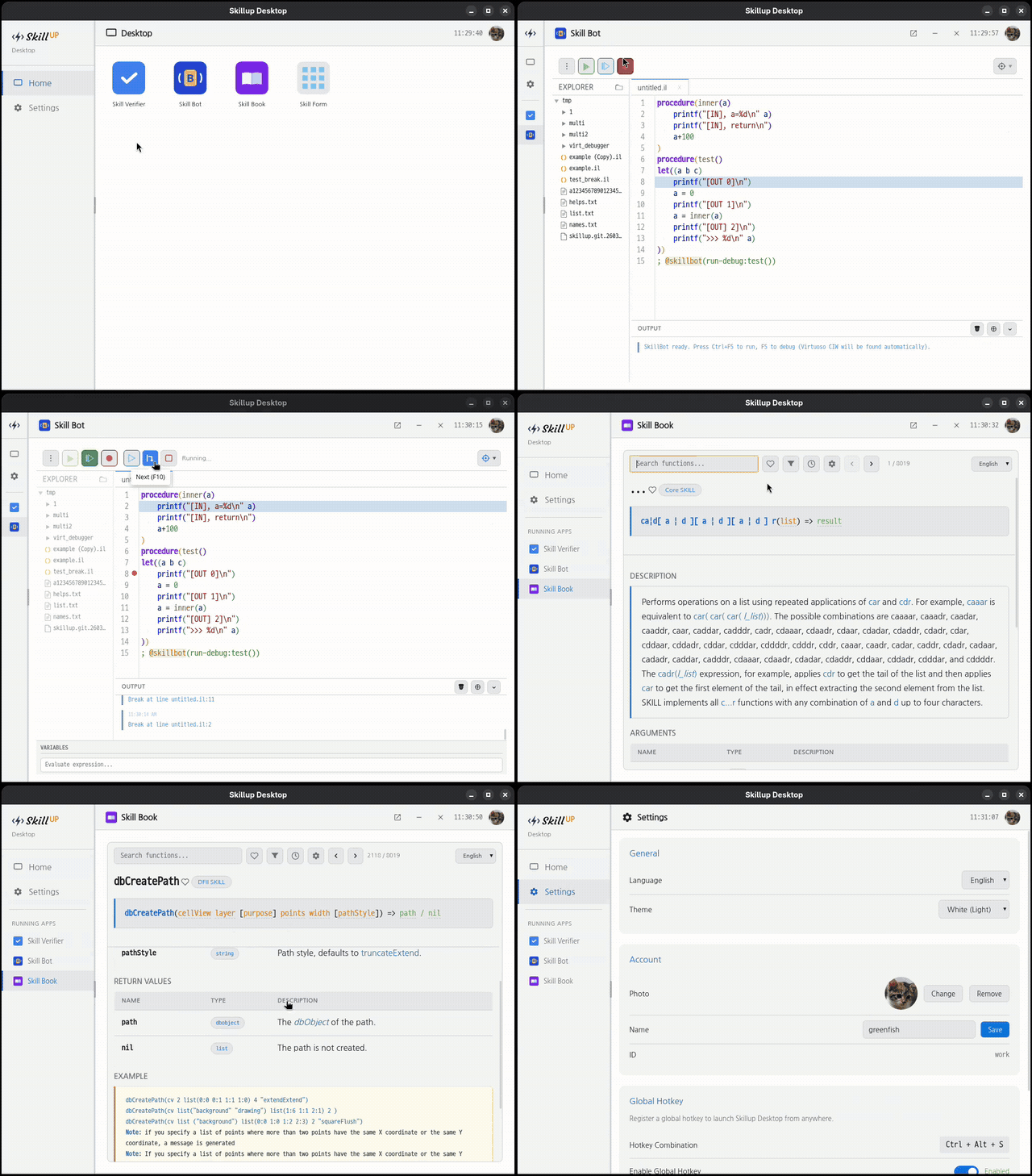
Built on Python + PySide2/PySide6 (Qt WebEngine), it provides a unified launcher for multiple SKILL-focused applications — code editing with live execution, static analysis, and API reference browsing — all in a single, cohesive desktop environment.
Why Skillup?
Cadence Virtuoso's built-in SKILL environment is powerful, but working with it day-to-day often means switching between a text editor, a terminal, and Virtuoso itself. Skillup brings these together:
Write SKILL code with syntax highlighting in a dedicated editor
Run scripts and see output immediately — no round-trips to the CIW
Catch bugs early with static analysis before loading code into Virtuoso
Look up APIs without leaving your workflow — 8,000+ built-in functions, searchable and browsable
Applications
Skill Bot — SKILL Debugger
Write, run, and debug SKILL scripts directly from the desktop. Syntax highlighting, integrated output panel, and step-through debugging — a full IDE-class experience designed around the SKILL language.
No Cadence license required. Unlike Cadence's SKILL IDE, Skill Bot runs entirely outside of Virtuoso. Debug your SKILL code freely, on any machine, without consuming a Virtuoso seat.
Skill Verifier — Static Analyzer
Detects common errors in SKILL code before runtime:
Check Description
Undeclared variables Variables used without let/prog declaration
Undefined functions Calls to functions not defined in scope
Parameter redeclaration Parameters re-declared as local variables
Mismatched parentheses Unbalanced ( ) across the entire file
Assignments in conditionals = used where == or equal was likely intended
Supports CLI and desktop modes. Incremental SQLite-based builds handle large multi-file projects efficiently.
Skill Book — SKILL Function Reference
A more powerful alternative to Cadence Virtuoso's built-in API Finder.
Search 8,000+ built-in SKILL functions with full argument descriptions, types, and examples
Add your own comments to any function entry — annotate what you've learned, gotchas, usage tips
Mark favorites to instantly surface the functions you use most
Keyboard-navigable. Multi-language display (English / 한국어)
Need the full 8,000+ function database? Contact greenfish77@gmail.com
Settings
Global configuration: UI language (English / 한국어), theme, user account, and a system-wide hotkey to bring up Skillup from anywhere on Linux X11.
Requirements
Component Requirement
Python 3.7 or higher
Desktop UI PySide2 or PySide6 (see below)
Image processing Pillow ≥ 8.0.0 (optional — for profile photo resize)
Global hotkey / clipboard python-xlib ≥ 0.33 (optional — Linux X11 only)
PySide2 vs PySide6
PySide2 PySide6
Python version 3.7 – 3.10 3.9+
Qt version Qt 5 Qt 6
Install pip install PySide2 pip install PySide6
Notes Required for CentOS 7 / RHEL 7 Recommended for modern systems
If both are installed, PySide2 takes precedence. The application auto-detects whichever is available.
Installation
git clone https://github.com/greenfish77/skillup.git
cd skillup
# Choose one — PySide2 (Python 3.7–3.10) or PySide6 (Python 3.9+)
pip install PySide2
# or
pip install PySide6
# Optional dependencies
pip install Pillow # profile photo resize
pip install python-xlib # global hotkey / clipboard (Linux X11 only)
Usage
Desktop
# Launch the desktop
python3 skillup.py --desktop
# Launch and open a specific app on startup
python3 skillup.py --desktop --app:skillbot
python3 skillup.py --desktop --app:skillverifier
skillup-tool (optional)
For site-specific Python interpreter configuration, create a skillup-tool/ directory as a sibling of skillup/:
skillup-tool/
skillup-python-selector.sh # prints the Python interpreter path to stdout
skillup-executor.sh # runs skillup.py with the selected interpreter
skillup/
skillup.py
...
skillup-python-selector.sh — outputs the full path of the Python interpreter to use. Implement this per-site to handle environments where the Python path varies by machine or user:
#!/bin/bash
echo "/path/to/site-specific/python3"
skillup-executor.sh — reads the interpreter path from skillup-python-selector.sh and launches skillup.py with any arguments passed to it:
skillup-executor.sh --desktop # equivalent to: python3 skillup.py --desktop
skillup-executor.sh --app:skillform # equivalent to: python3 skillup.py --app:skillform
When skillup-tool/ is in place, skillform callers can use the *_with_executor() API to resolve the Python interpreter automatically at runtime, without hardcoding a path:
Python: SkillForm.with_executor(form_path, skillup_py) instead of SkillForm(form_path, skillup_py, python_bin)
SKILL: skillformRunWithExecutor(formPath skillupPy handler) instead of skillformRun(formPath skillupPy pythonBin handler)
Roadmap
Enhanced SKILL debugging support (breakpoints, variable inspection)
Additional static analysis rules
Layout automation utilities
More built-in apps for common SKILL workflows
'프로그래밍 > Let's Share it' 카테고리의 다른 글
| scintilla editor example (0) | 2023.03.30 |
|---|---|
| [알고리즘] 길 찾기 algorithm (bfs, dynamic programming, DP, 다이나믹 프로그래밍 (0) | 2018.05.27 |
| python input시 timeout 지원하기 (python input timeout) (1) | 2017.07.18 |
| CAtlArray의 Linux(gcc) 버전 (0) | 2016.02.01 |
| zlib 1.2.8 C++ 방식으로 편리하게 사용하기 (0) | 2016.01.13 |
 Prev
Prev




 Rss Feed